















If you are considering using Showit for your website platform, but not sure which hosting plan is right for you, this post breaks it all down for you!
Showit is extremely unique compared to other website hosting services in that when you purchase a Showit subscription, you don’t just get boring storage space for you website files… You get a best-in-class website builder that makes it super easy to create your own website theme design, without any code what-so-ever.
(This article contains affiliate links, which means I may receive a small commission for purchases made through links in this post at no extra cost to you. I only recommend products I 100% believe in and use myself. Read the Privacy Policy for details.)
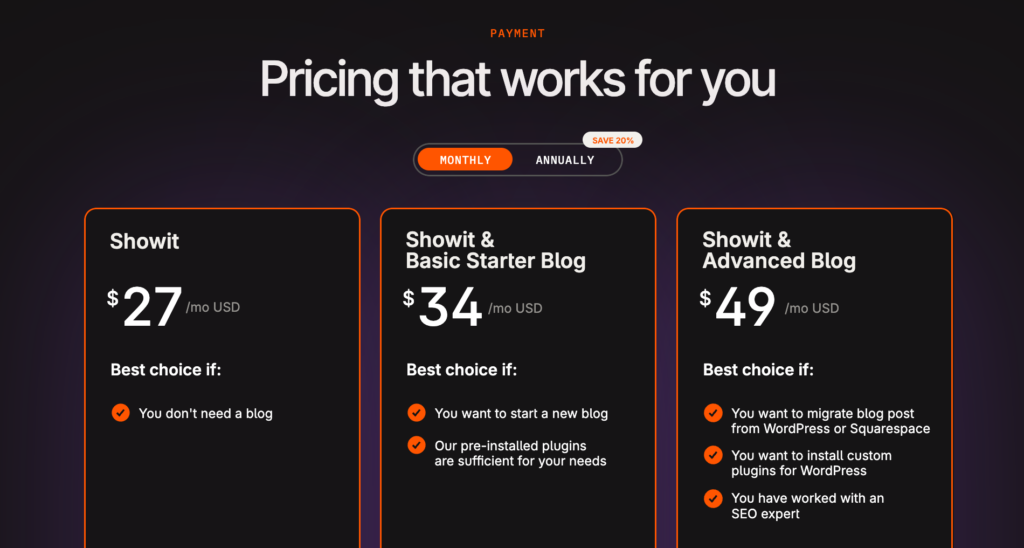
Showit’s pricing is relatively straightforward, but I wanted to break down what you get with each of their different tiers. Here is a quick overview:
| Showit Basic | Non-bloggers | $27/mo. (or $259 billed annually) |
| Showit + Blog | Simple WordPress integration | $34/mo. (or $326 billed annually) |
| Showit + Advanced Blog | Full WordPress plugin access | $49/mo. (or $470 billed annually) |
Basic Showit Pricing Plans
While Showit pricing plans may be a little more expensive than your average run-of-the-mill hosting services, what you get in return is 1000% worth the investment.
Here’s a breakdown of Showit’s different hosting options, which include both month-to-month pricing and a discounted annual subscription:
Showit Pricing – Tier I: Showit
Also, just called the “Showit” plan, this is the most basic hosting option Showit offers and the cheapest. If you are just looking to get access to Showit’s page/theme builder and don’t want or need WordPress (or a blog), then you should select this plan. You’ll also get:
- Free SSL Certificate (HTTPS)
- 20 GB of File Storage & Website Hosting
- Website Backups (stored for 7 days)
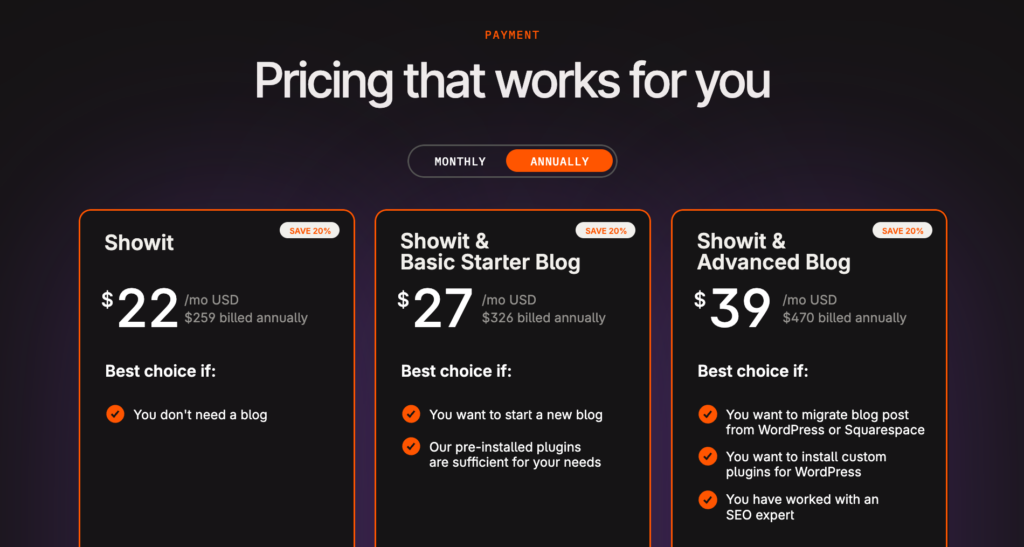
You pay $22/mo. (billed annually $259) or $27/mo. (billed monthly)
Showit Pricing – Tier II: Showit + Basic Blog
This plan is called the “Showit + Basic Starter Blog” hosting plan and is the middle tier option. If you are interested to start a new blog or migrate your existing website which has less than 50 blog posts / 10K monthly visits, this is the Showit hosting option for you. In addition to everything you get in Tier #1, you’ll also get:
- WordPress Hosting via WP Engine
- One WordPress User
- Daily blog backups, stored for 30 days
- Preinstalled plugins
- Simple Blog Migration (up to 50 posts for select platforms only)
You pay $27/mo. (billed annually $326) or $34/mo. (billed monthly)
Showit Pricing – Tier III – Showit + Advanced Blog
This plan is called the “Showit + Advanced Blog” hosting plan and is the top tier option. This is the best option for you if you want to use advanced plugins with WordPress such as for e-commerce, have a blog with more than 50 posts or get up 25K in monthly website visitors. In addition to everything you get in Tier #1, you’ll also get:
- WordPress Hosting via WP Engine
- Unlimited WordPress Users
- Daily blog backups, stored for 30 days
- Unlimited Plugins
- Blog Migration (for WordPress or Squarespace sites only)
- FTP & Database Access
You pay $39/mo. (billed annually $470) or $49/mo. (billed monthly)

High-Traffic Showit Pricing Plans
If you have a high-traffic website/blog, Showit offers additional hosting plans for you. For the purposes of Showit’s pricing tiers, a high-traffic website is considered one that receives more than 50,000 monthly visitors. This won’t apply to most newer businesses or the majority of website owners, but is available for those who need it. High-traffic plans offer additional storage space for your blog and more bandwidth for increased website visitors.
- Showit + Advanced Blog (100K) – $79/mo. or $758/yr
- Showit + Advanced Blog (up to 200K) – $149/mo. or $1430/yr
- Showit Self-Hosting Subscription (200K+) – Contact Showit
Why Pay More For Showit Hosting
It’s not a secret that Showit isn’t the cheapest hosting option out there, but it’s for many good reasons. (If finding the cheapest solution for your business is your focus, then Showit probably isn’t for you.)
Here are just a few reasons why I and so many other creative professionals and business owners are willing to pay more for Showit hosting.
Showit Chat Support – One of Showit’s most amazing features that they don’t even advertise is that all of their plans come with chat support. This has been so helpful for maintaining my own Showit website, in addition to my helping my clients launch their own Showit websites. If you ever run into a hiccup with your Showit site, support is there with actual answers. Plus, their GIF game is on point too!
Blog Migration – If you are on Squarespace or WordPress, Showit can help you migrate your existing blog content into Showit for free! Not all website hosting companies will do this. Some will charge you for it or tell you to hire a developer or do it yourself.
Creative Freedom – A lot of other website builders and platforms throw this term around loosely when it comes to web design, but with Showit, it’s 100% a reality. With over 15 years of web design experience under my belt, and after using so many other platforms and themes, I can without hesitation say that Showit is the best. Showit makes designing your website *SO* easy, whether you are a designer or just someone who likes to flex their creative muscles. With Showit, you can create a custom-looking website without having to know any code.
Showit Design Community – Showit is more than just a hosting service. It’s a community of die-hard fans, designers and users. If you ever wondered if or how something was possible to create in Showit – you can reach out to the Showit Facebook User group and have your question answered by one or more of it’s helpful members (yours truly included)!
FAQs About Showit Pricing
It depends on which hosting plan you use and what functionality you need. Showit’s basic hosting plans range from $27/mo to $49/mo, depending on what features you need for your website. The hosting cost increases for websites with high-traffic needs e.g. 100k monthly users.
For most of my clients, coaches, speakers, authors, the Basic Blog plan at $34/month is the sweet spot. It gives you everything you need to run a beautiful, functional site without paying for features you will never touch.
You can totally create your Showit account without a blog. If you are starting to get serious about SEO, you can easily upgrade your account to a Basic Blog or Advanced Blog plan at any time through Showit support.
It’s basically a wash. Squarespace runs around $26/month at a comparable tier, Showit is $29. For a couple of dollars more you get a design experience that is genuinely in a different league. Most of my clients prefer the flexibility of Showit over Squarespace and a few dollars a month proves to be worth it for them.
Wix plans on the other hands currently run from $17/month on the Light plan up to $36/month for the Business plan billed annually. Showit’s Basic Blog plan sits at $29/month, so yes, you can find a cheaper Wix plan, but here is what that cheaper plan actually gets you…
The $17 Wix Light plan is really built for personal sites and portfolios… it removes Wix ads and gives you a custom domain, but it is light on features by design. To get anything close to what Showit offers in terms of design capability, you are looking at the Core plan or higher. And even then, the design flexibility is not remotely in the same category. Wix uses a grid-based drag-and-drop editor. Showit is a true pixel-perfect canvas, which is why it is the platform I recommend to every personal brand client I work with.
The other thing worth knowing: Wix charges transaction fees on payments processed through their platform, and app costs for anything beyond the basics can add another $3 to $20 per month pretty quickly. So that “cheaper” plan has a habit of getting less cheap once you actually build out your site.
Yes! Showit has 14-day free trial and no credit card required to get started. If you use my affiliate link you can get an extended trial for 30 days, which gives you a little more time to actually poke around and build something before committing. You can also try the Showit app for free without even signing up by picking a demo site to start customizing.
A few things worth knowing upfront: your domain registration is separate, email marketing is separate, and if you need e-commerce you will be pulling in a third-party tool. None of that is a dealbreaker, it just means your total monthly costs will be a little higher than the Showit plan price alone. Factor that in when you are budgeting.
Create Your Showit Account Today
If you still aren’t convinced about why you should pay for Showit or what makes it worth the investment, you might want to try out a Showit demo site for free.
Click the link and the choose any free template to demo the Showit builder instantly, without even creating an account. Looking for a Showit coupon code? Interested in a free month of Showit?
Use my special referral link to pay $0 for your first month’s subscription. Have another question about Showit or my Showit website templates? Shoot me a message!