















I know all too well what it feels like to stare into the void, wondering if your SEO is actually doing its job. You’re publishing blog posts. Tweaking your website. Trying to “do the right things.”
And yet… you still find yourself wondering: Is any of this working?
For a long time, SEO felt mysterious to me too. Like something you were supposed to trust blindly and hope for the best. But everything changed once I learned how to track keyword rankings and actually watch how my website responded over time.
Once you can see your data, SEO starts to feel a little like magic. Then it’s just about pulling the right levers, putting in consistent effort before you start seeing real, measurable organic traffic show up.
Why tracking your keywords matters
Tracking your keyword is critical for seeing whether your website is gaining visibility, earning trust with Google, and moving in the right direction. And the good news is you don’t need really need all that expensive software or a background in SEO to do this well.
One the flip side, if you aren’t tracking your keyword rankings things then you could very well be putting a ton of wasted effort into SEO. Obviously this is something you want to avoid…so learning how to track your rankings, even at a base level, is a critical skill that will ensure you are making the most of your time spent on SEO.
This is where things start to get fun, I promise!
What keyword rankings really tell you
An organic keyword ranking simply shows where your website appears in search results for a specific phrase, without paid ads involved. Your rankings are something that are constantly changing and evolving and this should be something that monitor over time (not just a one-and-done).
When you monitor your search engine rank consistently, you’re looking for patterns:
- Are your pages slowly climbing?
- Are new keywords starting to appear?
- Is Google beginning to associate your site with certain topics?
Sometimes it can take a few weeks before you notice any significant changes from your SEO efforts.. Monitoring your keyword rankings will help you spot that momentum early, likely before you seen any traffic spikes or your inquiries increase.
That said, rankings are not the whole picture. They can’t tell you why something isn’t moving, or whether your website is actually built to support growth. I’ll come back to that in a minute.
If you’re wondering how to check keyword rankings, the good news is you don’t need expensive software or a background in SEO to do this well.

Best Tools for Checking Your Keyword Rankings
1. Google Search Console
If you only use one tool, let it be Google Search Console. (Note: this is different from Google Analytics and will need to be set up separately if you don’t already have a GSC account!)
Not only is Google Search Console free… it’s straight from Google so you know the info is going to be reliable and up-to-date. Here are the kind of things you can check on Google Search Console:
- which keywords your site is appearing for
- average position for each keyword
- impressions (how often you show up)
- clicks (how often people actually click)
This is a great way to monitor organic keyword rankings because it shows real data, not estimates, like third-party tools.
2. Third-party rank trackers
If you want something more visual, a third-party rank tracker can also be super helpful, especially if you like seeing changes at a glance or want long-term reporting.
Just keep in mind that most free + paid tools are best used for general insight, not absolute precision since the data is usually an estimate.
They’re great for answering if a certain page is moving up or down or if you’re efforts are generally working. Here are a few third-party ranking tracker tools you can try:
- What’s My SERP (Free / Paid)
- Ahrefs (Paid)
- Ubersuggest (Free / Paid)
However, to keep things simple for the purpose of this post, I’ll be using Google Search Console to show you how you can track your rankings next, although you can use whichever tool you feel most comfortable with.
How to Check Keyword Rankings with Google Search Console
Step 1: Open the Performance report
Go to Google Search Console. Once you’re looking at your dashboard, click on Performance → Search results in the left-hand menu.

This is the main dashboard where all the good stuff lives. At the top, you should see four metrics:
- Total clicks
- Total impressions
- Average CTR
- Average position
Make sure all four boxes are selected. This gives you the full picture instead of just one metric.
Step 2: See which keywords your site is showing up for
Scroll down to the table below the graph and make sure the Queries tab is selected.

This list shows:
- every keyword your website has appeared for in Google search
- even keywords you didn’t intentionally target (which is often very revealing)
This is my favorite part because it tells you how Google currently understands your site, not how you hope it understands your site.
If you see keywords here that surprise you (in a good way), that’s a sign your visibility is growing!
Step 3: Check average position for each keyword
Still in the Queries tab, look at the Position column. This shows the average position your site ranks for each keyword over the selected time period.
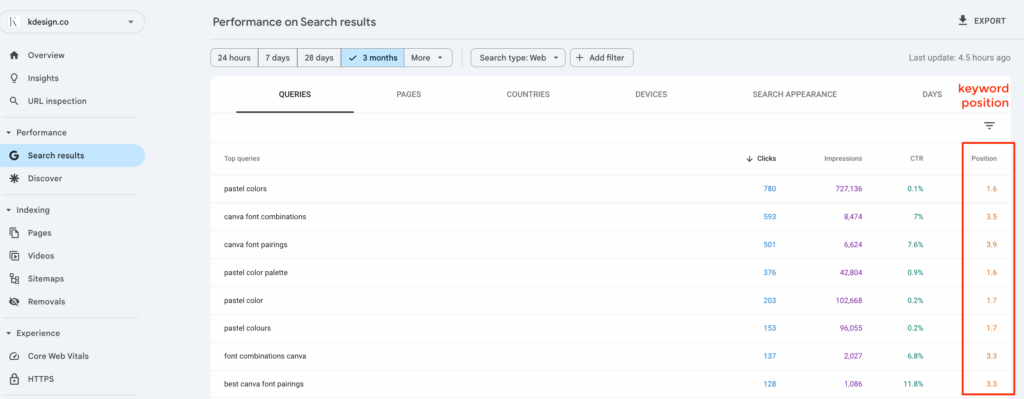
A few important reminders here:
- You don’t need to be #1 for this to matter
- Most rankings from 2-9 still typically receive a noticeable amount of traffic
- Movement from position 40 → 18 is a big deal
- Page two rankings (positions 20-29) are often closer to page one than you think
When I’m monitoring organic keyword rankings, I’m looking for direction, not perfection.
Pro tip: It can be exciting when you move into the top 10-20 positions for a keyword, but don’t obsess over your exact positions. Rankings can fluctuate, sometimes even daily. Look for trending upward movement over weeks and months, that’s where the real story is.
Step 4: Understand impressions (how often you show up)
Next, look at the Impressions column. Impressions tell you how often your website appears in search results, even if no one clicks yet.

I think this metric is underrated. Rising impressions usually mean:
- Google is testing your site more
- your content is gaining relevance
- visibility is growing before traffic follows
If impressions are increasing, that means your SEO is working, even if your clicks haven’t caught up yet.
You’ll notice a lot of my own impressions come from searches around color palettes and fonts… that’s intentional. These posts bring in consistent organic traffic and show exactly how SEO momentum builds over time.
Pro tip – You can optimize your meta descriptions to help increase the number of click throughs you’re getting from search results. See my next point…
Step 5: Review clicks (how often people actually visit)
Finally, you can look at Clicks. Clicks show how many times someone actually chose your site from search results.
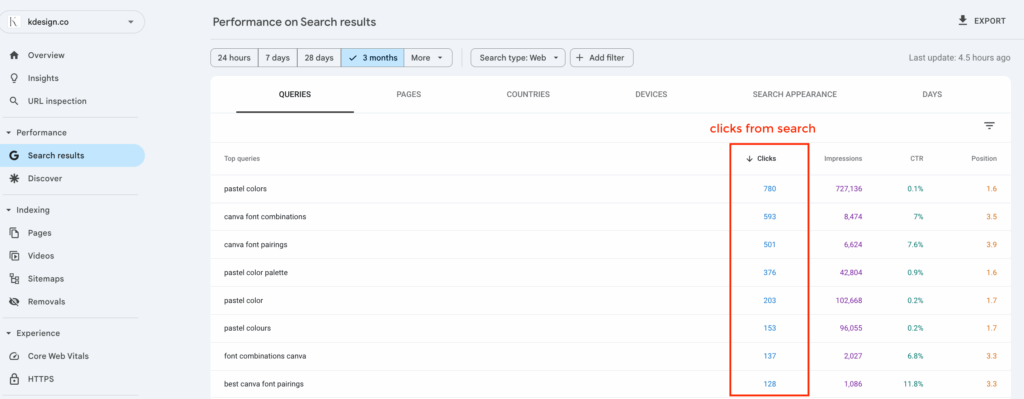
If impressions are high but clicks are low, that doesn’t mean your site is a failure…instead think of it like feedback.
This usually means that there is room for optimizations like:
- page titles that could be clearer
- meta descriptions that don’t match intent
- content that ranks but doesn’t feel compelling yet
This is where small tweaks can make a big difference.
Step 6: Check which pages are actually bringing you traffic
Once you understand which keywords your site is showing up for, the next obvious question you probably have is: Which pages are doing the work?
This step helps you connect your search data to real optimization opportunities.
In Google Search Console, click the Pages tab (right next to Queries).

This view shows you:
- which pages are getting impressions
- which pages are earning clicks
- which pages Google is already testing in search results
I love this report because it immediately tells you where to focus your effort, instead of just guessing.
How to see which keywords are driving traffic to a specific website page
You can take this information a step further by…
- Once you’ve selected a specific page, switch back to the Queries tab
- You’ll now see the exact keywords that page is ranking for!
This is incredibly helpful for optimization. When you’re reviewing page-level data, you can ask yourself:
- Is this page ranking for the keyword I intended?
- Are impressions high but clicks low?
- Is the average position close to page one?
If the answer is yes, that website page is a prime candidate for optimization. Often, small updates like clarifying the main keyword or adding internal links can make a big difference.
You don’t need to create more content right away, sometimes your biggest wins come from improving what’s already there. I’ve seen how impactful this can be firsthand time and time again.
In fact, recently just updated one of my old blog posts from a couple of years ago. It wasn’t ranking for the keyterm I originally targeted so I decided to pick a different keyword angle and re-optimize the page with a more thorough understanding of the topic.
In just a few days I saw increased ranking changes that put me in the top 10 rankings and I started seeing traffic almost immediately! While this is not a typical result for most websites, I believe with consistent effort, you’re ability to rank and influence those rankings can get easier over time.
Why tracking your rankings alone isn’t enough
Tracking keyword rankings won’t fix a website that isn’t built to rank in the first place, but it can provide you with the data you need to make decisions that can improve your rankings.
Don’t fall into the trap of simply monitoring your rankings, but not doing anything about it. If you rankings aren’t moving, it’s not because SEO “doesn’t work,” but because the foundation underneath it needs attention first.
Keyword rankings can’t fix:
- unclear page purpose
- weak site structure
- mismatched keywords
- missing internal links
- pages that don’t fully answer search intent
So while monitoring your rankings is important, it only works when your website gives Google something solid to work with.

Other Common Questions About Keyword Rankings
For a lot of people, digging through your SEO data can raise more questions than it answers… especially when you’re just starting to track your keyword rankings. Here’s some clarity around the most common sticking points I see.
This might surprise you, but checking rankings too often can actually create more stress than clarity. I usually recommend:
– weekly or bi-weekly check-ins
– monthly trend reviews
SEO works best when you give it a little room to breathe. Watching daily changes can make you feel like something’s wrong when it’s often just normal movement.
Changes in rankings largely depend on your site health, authority and posting frequency. A more established, authoritative site can register ranking changes relatively quickly, while a newer site may take longer to see progress.
In most cases, you’ll start seeing movement within a few weeks, but meaningful progress often takes a few months. That’s why I always recommend looking at trends over time instead of obsessing over daily changes.
There’s no single “good” number. An average position of 15 can be incredibly promising if it’s trending upward. You should care much more about direction and consistency than hitting a specific rank right away.
For most business owners, Google Search Console is more than enough. Paid tools can be helpful, but they’re not required, especially if your website foundation and content strategy aren’t fully dialed in yet.
(Disclaimer: I do actually use a paid tool to track my own rankings, however, I also manage SEO for clients so the return on investment makes it worth it for me.)
This could be for a few reasons… When I’ve seen this happen before it’s usually because the keyword you are trying to target is too competitive compared to your domain authority and/or because you’ve not optimized your page fully.
Take a look at what websites are ranking for the keyword you are trying to rank for by doing a quick Google Search and gauge how your page content stacks up against theirs. Take note of how long their page is, what their headings are, how comprehensively they’ve covered the topic, etc.
Remember: If you’re trying to outrank other sites to get in the top 10, your content has to be written at the same level.
Want help figuring out what to track in the first place?
If you’re not sure which keywords your website should be ranking for, or why your rankings aren’t moving yet, that’s exactly what a website audit can help you uncover.
I offer these as a low-risk way to help you pinpoint what’s holding your website back before you worry about tracking results.
Learn more about how a website audit can help with your SEO + traffic
Or, if you want to build a stronger foundation first, my DIY Website Planner walks you through creating a site structure that supports SEO growth so when you do track rankings, they actually mean something.