













Launching a brand-new website is exciting… until you realize Google is basically standing there with its arms crossed like, “Cute. But who are you again?”
And if you’re anything like me (or my clients), you want your site to actually show up when someone searches for your business…not sit in the void quietly hoping for traffic. That’s where SEO becomes your new secret weapon.
Launching a website without an SEO plan is like decorating a storefront on a side street no one knows exists. People can find you… but only if you put out the right signs.
So I wanted to share everything I look at when I’m helping a client prepare for a new website launch (or a website redesign), what to do before you hit “publish” and what to do right after.
Consider this your new website’s SEO plan, broken down step by step. If you want to quickly jump to each of the steps, you can use the table below.
| SEO Steps Before Launch | SEO Steps After Launch |
| 1. keywords researched + mapped | 1. submit sitemap to GSC |
| 2. meta titles + descriptions written | 2. check indexing |
| 3. URLs cleaned-up | 3. publish new content |
| 4. internal linking | 4. get backlinks |
| 5. images optimized | 5. monitor rankings |
| 6. Google Analytics setup | 6. interlink future content |
Why SEO Matters So Much for a Brand-New Website
Unfortunately, search engines don’t instantly know your website exists as soon as you publish it. They have to learn over time:
- what your site is about
- who you serve
- which pages matter
- and why you deserve to show up for certain keywords
Something I think a lot of people don’t know is that your website builder or website template doesn’t automatically have SEO “built-in” (unless you invested in a custom website and SEO was a part of the service provided).
If you’re using a website builder or template, most likely your design has an SEO-friendly structure and the capabilities to edit your SEO but I’ve never seen a website builder that can “do” all your SEO for you out-of-the-box. That’s because implementing SEO on your website requires understanding of your business + keyword research and this isn’t something a pre-built template can inherently “know”.
No template can anticipate how you might adjust the pages, titles, design, structure, navigation and site flow. Nor does your website builder know where you’re geographically located or who your target audience is.
All this impacts your SEO and this is stuff you have to tell it.
I don’t think any website platform is exempt from this. I’ve seen websites on all sorts of platforms that don’t have properly optimized pages: WordPress, Wix, Showit, Weebly…
If you are having trouble ranking your new website on Google… it’s most likely not the platform’s or the template’s fault. It’s usually either 1) lack of understanding how SEO works, 2) low content volume and/or 3) a low domain authority to start.
That’s why when your brand-new website goes live and you haven’t optimized your SEO, Google treats it like the new kid at school: “I see you, but I don’t know you yet.”
But it’s not all doom and gloom, I promise. Good SEO practices can help shorten that awkward get-to-know-you phase so you can show up sooner, rank faster, and actually get visitors who want what you offer.
But first…

What Effect Does SEO Have on Your Search?
Here’s the simplest way I explain this to clients:
Imagine someone Googles “Indianapolis web designer” or “coaching for creatives” or “best Showit website templates.”
Google has one job: show the most relevant, trustworthy results FIRST. SEO is what tells Google:
- “Hey, this website is actually about this topic.”
- “These pages answer this search query really well.”
- “This site is organized, legitimate, and helpful.”
- “This business is real and people talk about them.”
So the effect SEO has on your search is basically: where you show up (rankings), how often (impressions) and how visible you are to your ideal clients (traffic).
Without SEO, you might be on page 9 forever. And nobody, and I mean NOBODY, is scrolling that far unless they’re looking for homework answers or conspiracy theories. lol.
With SEO, you can actually become discoverable. This is why SEO for new websites matters so much. Doing these steps now helps Google understand your site faster so you can start ranking sooner.
Okay. Let’s get to the good stuff.

SEO Steps to Take Before You Launch Your New Website
This part is critical. Think of it as laying the foundation before you build the house.
These are the exact steps I take on my clients websites before we launch their site:
1. Map Out Your SEO Keywords for Each Page
If SEO feels overwhelming, this is the part that usually makes it click. Every page on your website needs a job, and a keyword that supports that job.
You can arrange all this information in a spreadsheet with columns for your page title, target keyword (and URL if you want).
Here are a few examples of how that might look:
| Homepage | web designer for women |
| Services page | website design for small businesses |
| About page | your name + brand keywords |
Use a keyword research tool like UberSuggest, ahrefs or Keywords Everywhere to look up keyword data. For a new website, I recommend choosing:
- 1 primary keywords per page
- 2–4 supporting keywords
- search intent that matches what your reader ACTUALLY wants
..And in case you’re wondering what “search intent” means…
When someone types something into Google, they’re not just typing random words. They’re asking a specific question with a specific goal in mind. That goal is the “search intent.”
For example:
- If someone searches “Showit website template for coaches” their intent is to find a template to purchase most likely.
- If they search “how to create a brand mood board” they’re looking to learn something, not buy something (yet).
- If they type “website designer near me” they’re basically ready to hire someone.
So when I’m mapping out SEO for a new website, I’m always thinking: What was this person hoping to find when they typed this in…and does my page deliver that?”
If you match the intent, you are much more likely to win that traffic. If you miss the intent, Google pushes you aside and shows someone else.
Once you’ve found + chosen your keywords, you will want to make sure you actually use them on your site pages properly:
- Especially in your H1 heading (make sure there’s only one H1 per page)
- Also in your H2-H3s, etc.
- Sprinkled throughout your paragraph text
- And also in your SEO Title + meta description (keep reading!)

2. Write Your SEO Meta Titles + Descriptions
Do NOT wait to write these after launch. They belong in your strategy before the site goes live.
Your meta title helps you rank (along with the on-page content).
Your meta description encourages people to click from search results.
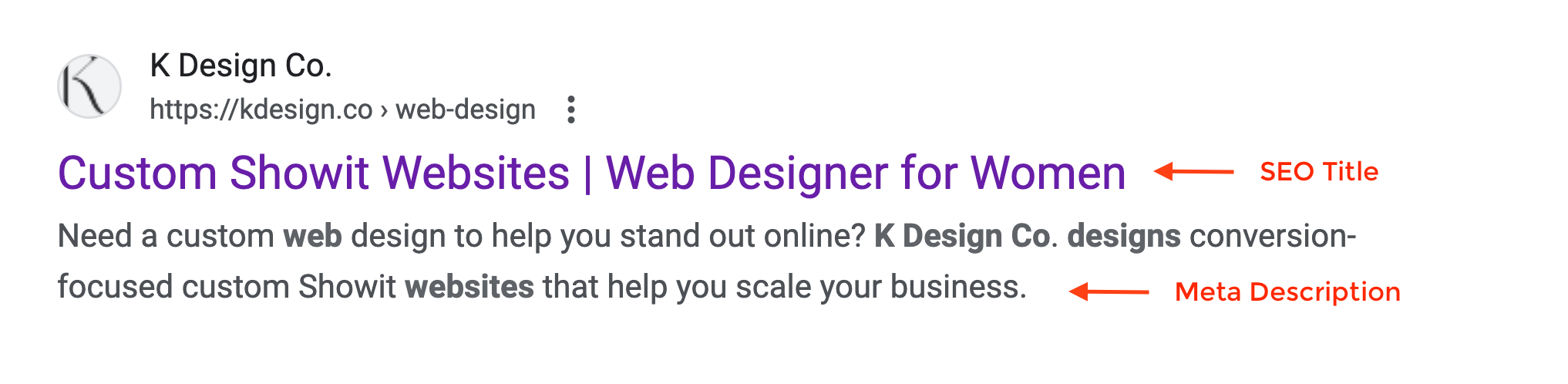
Both of these should be direct, benefit-driven, keyword-aligned and most of all… sound human. Not like a robot.
You can include this information in the same spreadsheet you have your keywords mapped in to keep things organized before you are ready to add it to your website. Do this for every site page you want to rank!
| Page | SEO Title | Meta Description | Keyword |
|---|---|---|---|
| Home | Web Designer for Women | Showit Web Design for Female Entrepreneurs | K Design Co is a Showit design partner + brand & web designer for women, offering custom websites, branding & Showit website templates. | web designer for women |
3. Clean Up Your URL Structure
This one’s pretty quick + easy. For a new website, keep your URLs: short, logical and readable.
So when you’re naming your website pages, pay attention to URL/slug that is generated / defined with every page you create. Avoid using numbers, dates or extra words, keep it short and sweet:
❌ kdesign.co/about-copy-1
❌ kdesign.co/services123
✔ kdesign.co/services
Google likes clean structure and so do people. (This same principle applies to any blogs that you may write in the future too!)

4. Build Internal Links (Before You Launch)
Internal links are simply any link you add to a site page that links to another site page. Internal links tell Google:
- which pages relate to others
- which pages are most important
- how your site is organized
A brand-new website with zero internal linking is like handing Google a 500-piece puzzle with no picture on the front of the box. You’re just making its job harder.
Pro tip: Make sure your anchor text (the text you add the link to) is descriptive (ideally includes a keyword) instead of generic “click here” wording…Google uses it as a clue for what the linked page covers.

5. Optimize Your Images (This is big for new sites!)
If you’re launching with a big photo-heavy website, this really matters. I think a lot of people skip this step because they don’t know how it affects their SEO and because it can be time-consuming, but image optimization can really help your SEO and site experience in multiple ways.
…so here’s how I approach this.
- First, start by making sure you are using the right image format: JPG (or WEBp if your platform allows it) for photographs or PNG/SVG for graphics or simple icons. Using the wrong image format can needlessly inflate the size of your images and make your pages load super slowly.
- Rename your image files with descriptive keywords – Use the filename to describe what’s in the image while also using keywords where they make sense. A good example would be “seo-for-new-website-checklist.jpg” (not IMG_4829.jpg or hero-banner-new.jpg)
- Compress / optimize your images – I love using TinyJPG for this! It usually cuts my image size by 40-60% with no visible reduction in quality or size. Aim to have all your images be 300-500kB or less. Your load time will thank you and so will your site visitors. (If your images take too long to load, users typically bounce and Google penalizes you for this too.)
- Add descriptive alt text to all of your images – This helps both for SEO and accessibility.
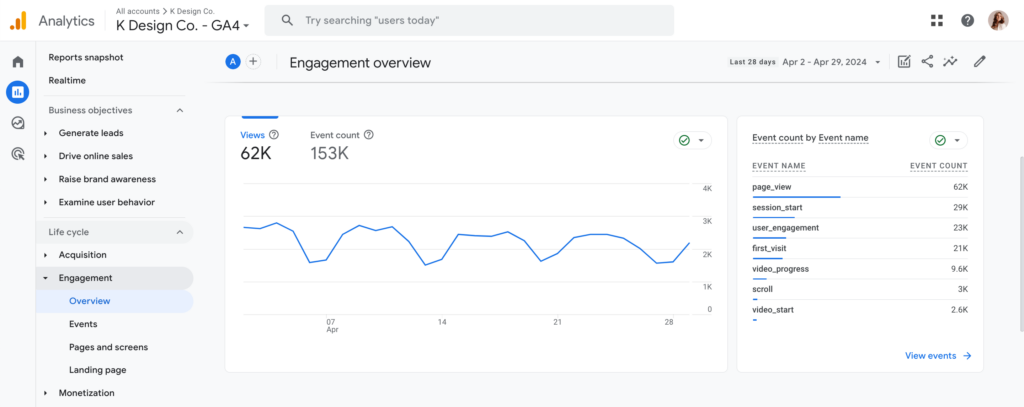
6. Set Up Google Analytics
Set up Google Analytics right before you launch so you can start tracking site traffic immediately.
Google Analytics breaks down your site traffic for all channels, not just search traffic. You can quickly see how many organic search visitors you are getting, but not what search queries drove them to your site.
- track traffic
- watch user flow
- see behavior patterns
Here’s a quick guide for getting started with Google Analytics.
SEO Steps to Take After Your Website Goes Live
You’ve made it this far, but your work is NOT done when you hit publish. Here’s exactly what I do for my clients after we launch their website:

1. Set up Google Search Console + Submit Your Sitemap
Google Search Console is something I recommend setting up immediately after launching your website and will give you insight into what people are typing into search to find you. This is a great tool to monitor search impressions for specific keywords and check which keywords are driving traffic to certain pages.
Right after you launch your site, go to Google Search Console, then:
- add your domain
- verify it (through DNS or a header code)
- add/connect to your sitemap
- check for any errors
This tells Google your site is new and you’re ready to have it crawled! Your sitemap should eventually auto-generate, but I always manually submit it for brand-new sites. It takes about 2 minutes so it’s easy win.
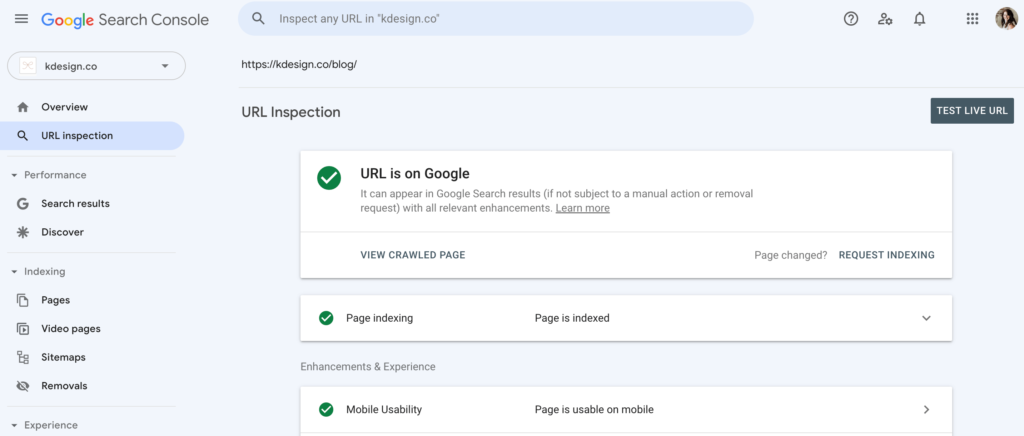
2. Monitor Which Pages Are Actually Indexed
OK… Now even though your website may be live and you requested indexing…. it doesn’t necessarily mean that Google is showing your site to people yet. Use Search Console to check this after it’s been a 1-2 weeks or so since launching.
Go to Pages → Indexing to check for any:
- blocked pages
- redirect loops
- “noindex” tags
- slow loading pages
New websites struggle most with indexing, not ranking…so this is important! You can work through the issues one-by-one.
Related Post: SEO Mistakes: 5 Reasons Your Website Isn’t Showing Up In Google Search
3. Publish High-Intent Blog Content ASAP
Publishing quality, high-intent blog content accelerates your website’s discovery on Google search. I usually encourage my clients to go-live with at least 3-5 blog posts on a new site, but if you’ve already published, you can and should still continue to publish new content after you launch.
Even ONE strong new blog post a month can help your site get crawled more often. If you need ideas on what to blog about or how to get started, check out these posts:
- Blogging Tips: How to Blog Consistently (Even When You Don’t Want To!)
- The Ultimate Guide to Blogging for Business + Why You Should Start Now
Once you’ve got a good rhythm for publishing content, give yourself a pat on the back. You’re now building authority.
4. Get Some Backlinks After You Launch
A backlink is just a link to a page on your website from another website. The more high quality backlinks you have, the more your site will appear trustworthy in the eyes of Google.
You don’t need anything crazy though. Here are examples of a few easy ways to get backlinks:
- get your brand listed on directories relevant to your niche
- get featured on a podcast – this is one of my favorite new things!
- collaborate with a business friend
- guest blog on a website in a complementary industry
- Use featured.com to weigh in with your expertise
5. Monitor Your Search Performance
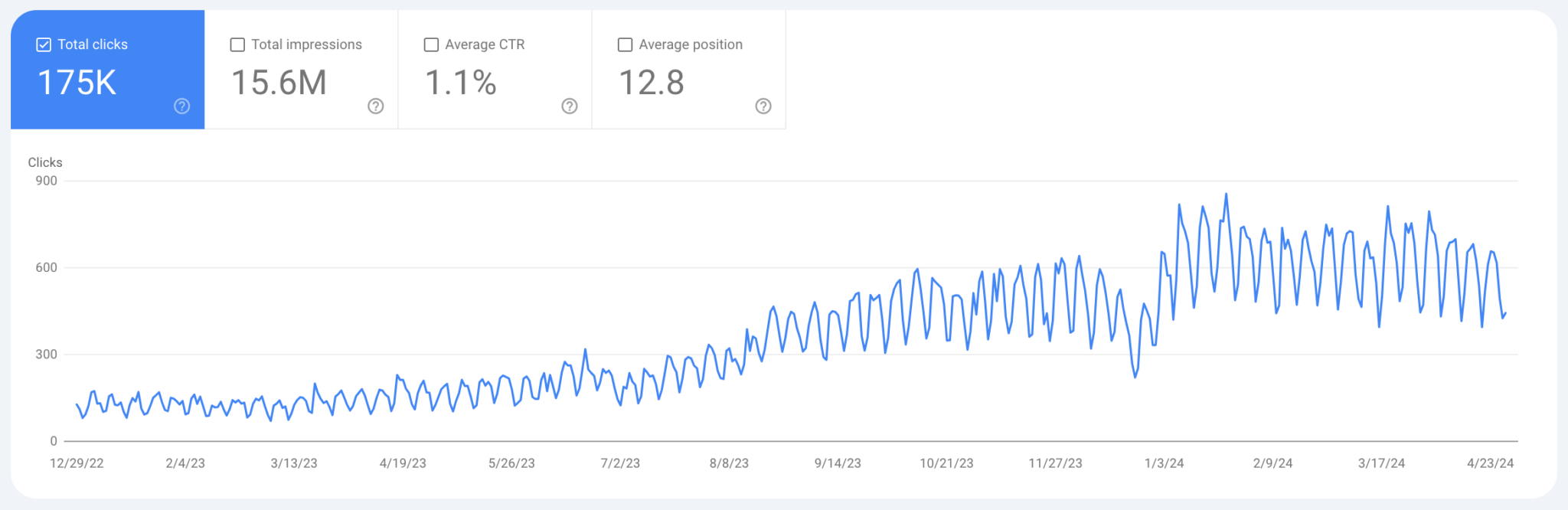
Periodically check your keyword rankings and search performance in Google Search Console to see if you need to adjust your SEO strategy. You’ll want to check things like:
- search impressions
- clicks
- search terms
- coverage issues
If your impressions are rising…that’s good. You’re on the right track.
6. Start Interlinking New Content
Whenever you write a new blog post, you should be linking to your existing pages:
- link service pages
- link your products
- link your shop
- link relevant posts
….Girl, link it all! Internal linking is the key to building topical authority and let’s Google know you’re expert on this stuff.

SEO Questions Almost Everyone Asks After Launching a New Website
Now that you know how to set your site up for SEO success, you might be thinking, “OK, now what?” When will I start seeing the impact of all my efforts?”
Here’s the answer, plus a few other commonly asked SEO questions clients ask me:
For most new websites: indexing can take days to a few weeks, early impressions usually appear within 2–6 weeks and meaningful rankings often take 3–6 months
What is worth paying attention to early:
– whether your pages are indexed
– whether Search Console shows impressions (even if clicks are low)
– whether Google is crawling your site regularly
If you’ve been live for a month and see nothing at all: no indexed pages, no impressions, no crawl activity, that’s when it’s time to investigate. Otherwise, patience + consistency beats constant tinkering. SEO rewards calm, steady signals, not random changes.
This is one of the most confusing (and panic-inducing) moments after launch, and it’s also completely normal. Google Search Console showing your page usually means Google knows the page exists. That’s indexing.
But showing up in search results is ranking… and those are two very different things.
For a brand-new website, Google often indexes pages first, then slowly tests where (or if) they belong in search results.
Early on, your site might only appear: for your brand name very long, specific searches or not at all unless you scroll deep
That doesn’t mean anything is broken. It usually means: your site is still building trust, Google is still learning what your pages are about, your content hasn’t earned authority yet.
Think of it like this… indexing is Google noticing you; ranking is Google recommending you… and that second part takes time.
Yes! Especially for low-competition, long-tail keywords. New websites can absolutely rank without backlinks when:
– the search intent is very specific
– the content is genuinely helpful
– the page is well-structured and internally linked
– competition is light or outdated
That said, backlinks still matter… just not immediately.
Think of it this way:
– On-page SEO + content helps you get indexed and lightly ranked
– Internal linking helps Google understand relationships of your content
– Backlinks help you compete once you’re aiming for higher competition keywords
For a new site, your goal isn’t “page one for everything.” It’s building credibility one layer at a time.
No! Editing your page content does not reset your SEO progress. In most cases, it actually helps, as long as you are making the right changes.
Updating a page can help clarify intent, improve relevance, fix weak spots and strengthen your keyword alignment.
The only time changes can hurt is when:
– you completely change the topic
– you remove helpful sections
– you strip out internal links
– you confuse the page’s purpose
Small, intentional improvements are a good thing, especially early on. Just avoid rewriting the same page every three days out of anxiety. Give Google time to process changes.
Final Thoughts
If you’ve made it all the way down here, congratulations… you now have a solid grasp on what it takes to rank your new website in search and you should have a great foundation for your website’s SEO launch plan.
Whether you’re launching on Showit, using one of my website templates, or working with a designer, these steps will make your launch smoother, smarter, and more strategic.
If you want a second pair of eyes on your SEO setup, you can book a website audit with me here.